1) execOnFocus
This small addon filters commands to ensure they are only executed when the game window is in focus.
It was designed for setups that involve certain input devices—ones whose inputs are detected by all running instances of the game, not just the focused one. Without filtering, a single input could trigger commands in multiple instances.
With this addon, commands will only be triggered if the game is currently focused.
Example devices: Windower Binder-compatible devices
How to Use
To use this addon, prefix your command with exof (short for execOnFocus). This ensures the command runs only when the game is focused.
Example:
Code
alias g600_M1G9 exof input /echo Key M1G9 Pressed.;
In this example, the command /echo Key M1G9 Pressed. will only be executed if the game window is currently active.
2) AliasMatrixBinder
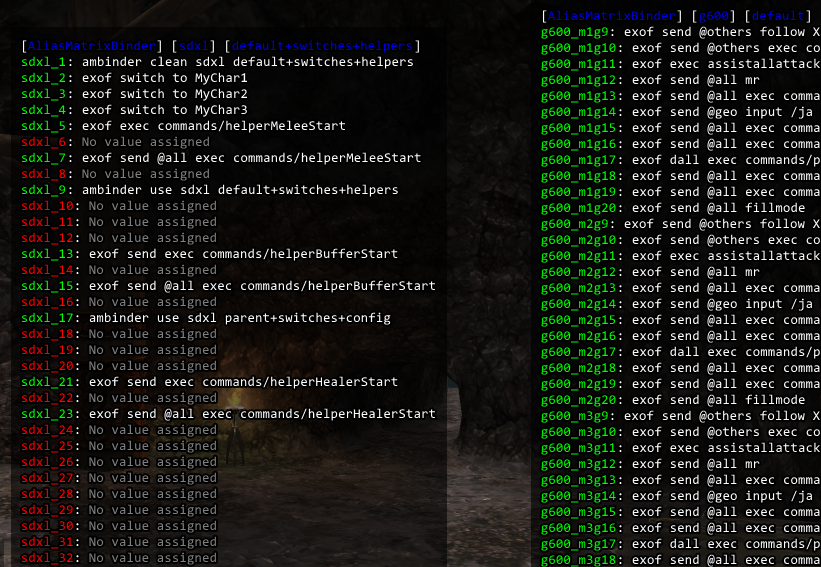
AliasMatrixBinder allows you to create and manage multiple sets of aliases for different gaming devices and automatically switch between them based on various conditions like login or job changes.
Features
Multi-Device Support: Manage aliases for different gaming devices
Automatic Loading: Apply specific alias configurations on login or job change
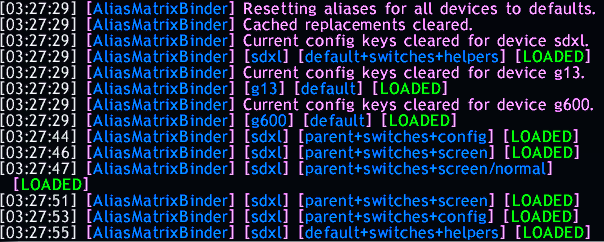
History Tracking: Keep track of previously used configurations
Template Replacements: Use placeholders in your aliases that get replaced with dynamic values
Flexible Config Keys: Combine multiple configurations using + syntax
Visual Display Boxes: Real-time status display for active devices
Commands
The addon responds to both //AliasMatrixBinder and //ambinder commands:
Basic Commands
Code
//ambinder help - Show help message
//ambinder reload or //ambinder r - Reload the addon
//ambinder reload all or //ambinder r all - Reload the addon on all characters
//ambinder list - List available devices
//ambinder repl - Show available template replacements
Device Management
//ambinder use <device_code> [config_keys] - Apply configuration to a device
//ambinder reset [device_code] - Reset device to defaults (or all devices if no code specified)
//ambinder clean <device_code> [config_keys] - Apply configuration with cleared history
History and Status
//ambinder history <device_code> - Show configuration history for a device
//ambinder current <device_code> - Show current configuration for a device
//ambinder prev <device_code> - Switch to previous configuration
Automatic Triggers
//ambinder setonlogin <device_code> [config_keys] - Set configuration to apply on login
//ambinder setonjobchange <device_code> [config_keys] - Set configuration to apply on job change
Usage Examples
Code
# Apply default configuration to device 'sdxl'
//ambinder use sdxl default

# Apply multiple configurations combined (example keys) and using placeholders
//ambinder use sdxl default+switches+buffers+cust_{player_name}

# Set automatic configuration for login
//ambinder setonlogin sdxl default+switches

# Set automatic configuration for job changes
//ambinder setonjobchange sdxl default

# View current aliases
//ambinder current sdxl

# Go back to previous configuration
//ambinder prev sdxl

# Display management
//ambinder show     # Show all device displays
//ambinder hide     # Hide all device displays
//ambinder toggle   # Toggle display visibility

# Reload functionality
//ambinder reload         # Reload addon on current character
//ambinder r              # Short form reload
//ambinder reload all     # Reload addon on all characters
//ambinder r all          # Short form reload all
File Structure
Code
AliasMatrixBinder/
├── AliasMatrixBinder.lua     # Main addon file
├── Commands.lua              # Command handlers
├── Helpers.lua               # Utility functions
├── DevicesMapping.lua        # Device definitions
├── data/
│   ├── settings.xml            # Settings and display configurations
│   └── custom_replacements.lua # Custom template replacements
└── devices/
    └── <device_code>/
        ├── default_aliases.lua  # Base aliases for the device
        ├── general.lua          # General aliases (auto-loaded)
        ├── <JOB>.lua            # Job-specific aliases (e.g., WAR.lua)
        ├── <JOB>_<SUBJOB>.lua   # Job combo aliases (e.g., WAR_NIN.lua)
        ├── <player_name>.lua    # Player-specific aliases
        ├── <player_name>_<JOB>.lua          # Player+job aliases
        └── <player_name>_<JOB>_<SUBJOB>.lua # Player+job combo aliases
Example Configuration
Setting up general.lua
Create a file at devices/{device_code}/general.lua:
Code
return {
    ["default"] = {
        -- General commands for the SDXL device
        ["sdxl_1"] = _addon.shortname .. " clean sdxl default",
        ["sdxl_9"] = _addon.shortname .. " use sdxl default+switches+helpers",
        ["sdxl_17"] = _addon.shortname .. " use sdxl default+config+switches",
    },
    ["switches"] = {
        -- Switch to different Characters
        ["sdxl_2"] = "exof switch to MyChar1",
        ["sdxl_3"] = "exof switch to MyChar2",
        ["sdxl_4"] = "exof switch to MyChar3",
    },
    ["helpers"] = {
        ["sdxl_15"] = "exof send @brd exec macro_brd_set_haste",
        ["sdxl_16"] = "exof send @cor exec macro_cor_set_chaos_sam",
    },
    ["config"] = {
        ["sdxl_1"] = _addon.shortname .. " prev sdxl",
        ["sdxl_18"] = _addon.shortname .. " use sdxl default+switches+wincontrol",
    },
    ["wincontrol"] = {
        ["sdxl5"] = "exof wincontrol move 1500 150",
        ["sdxl6"] = "exof wincontrol move 0 150"
    }
}