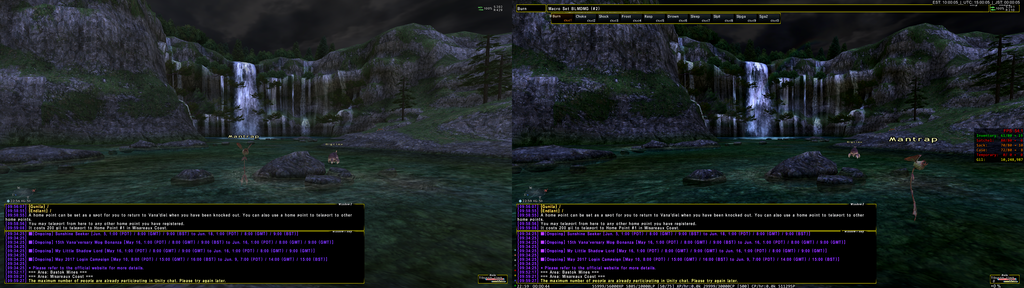
Skarwind, what are your setting to get your lighting like that? Did you mess with ambient lighting and gamma numbers in windower?
Slightly unrelated, but while I don't know if it depends on my local config or if it's a general thing, there's something off with ambient lightning since when we moved from Windower 4.2 to 4.3
I can't really explain, but you can see sudden changes of ambient lightning happening in the areas, and this totally didn't happen before windower 4.3
I just want to confirm, if I already have d3dcompiler_47.dll in my SYSWOW64 folder, do I still need to copy it over? If it's been answered already, I'm tried and must skipped over it
Seems to have worked right off the bat with no problems (just missing the mouse indicator but ill fix that soon in FFX config). Got the watermark on the bottom right. I set this up on my secondary rig to just to be safe, in case I fubared my PC I would still have my primary pc to play on.
First thing i'm noticing is the lights are a lot brighter in Reisenjima and the Ethreal ingresses look spectacular.
I need to read up on settings in Dgvoodoo.
Are TI GTX690 SLI bridged strong enough for me to ramp up the settings more?
If I feel comfortable with this is after some playing around I'll try it on the T1 1080 primary rig.
I just want to confirm, if I already have d3dcompiler_47.dll in my SYSWOW64 folder, do I still need to copy it over? If it's been answered already, I'm tried and must skipped over it
tested graphics in many zones. In Darker zones it looks spectacular. But if you want to see where it doesn't work so well, head to Xarcarbard and run up to castle zvahl entrance. Get close to those lights that shoot from the ridges and prepare to be blinded. Was way to bright for me.
Maybe I just missed the post but, anybody posted suggested (or even mandatory, if there are any) DGvodoo settings? There's a lot of stuff you can configure there.
Interested in this as well.
Here is mine, no FPS drop so far and rendering IG is pretty neat.
Looking to improve some more tho-(i5 6600k - GTX1070 8Gb - 16 GbRAM) http://hpics.li/6ca51f3 http://hpics.li/1bcf364
Watermark is checked here just to adjust between two instances.
Maybe I just missed the post but, anybody posted suggested (or even mandatory, if there are any) DGvodoo settings? There's a lot of stuff you can configure there.
Interested in this as well.
Here is mine, no FPS drop so far and rendering IG is pretty neat.
Looking to improve some more tho-(i5 6600k - GTX1070 8Gb - 16 GbRAM) http://hpics.li/6ca51f3 http://hpics.li/1bcf364
Watermark is checked here just to adjust between two instances.
Interested as ell as those setttings are all Greek to me !
Maybe I just missed the post but, anybody posted suggested (or even mandatory, if there are any) DGvodoo settings? There's a lot of stuff you can configure there.
Likewise, is there some settings you should turn on/off on the FFXIconfig? (Bump Mapping, shadows type, something else etc)
There's also that "Graphics stabilization" option on the FFXIconfig which got added aeons ago but I don't remember what it was added for and if it still serves a purpose at all.
Yeah. I'm not exactly sure if I should stop supersampling, or exactly what to turn on and off, other than no Phong shading.
Well supersampling is the best form of AA BUT it's crazy expensive performance wise as you are literally doing 4x the amount of work. So if people are having FPS issues you can try disabling supersampling or turn shadows down to normal. Turning shadows down to normal nearly doubled my FPS in area's with a lot of players. Then there is MSAA and AF, since I'm running at 2560x1440 with 2X SS, I turned AF to 16x but kept MSAA at none. Phong shading is a very hit or miss tactic, I wouldn't recommend it for this game. Fast memory access breaks screenshot ability so don't use that either.
Right now I'm working on getting ReShade working which is much more difficult then dgVodoo2. ReShade lets you do all sorts of really amazing graphical effects via shaders by proxy chaining to the dxgi.dll.
For the record my setup is dual GTX 980ti's with water but only one is running for FFXI. CPU is Intel i7-4790K also on water. People with lower graphics cards aren't going to have as big an effect as those with heavier graphics cards.
Everything is running great and love the performance improvement, is anyone else having issues with resolution in windower taking to white screen? I still can't run windower at the same resolution as my display (like I was before Voodoo)
Can only think VRAM or DX feature level on GPU. What GPU do you have and how much memory is on it?
It is a laptop, it has an NVIDIA GeForce GTX 960M with 4GB of vram.
Hmm inside dgVoodoo2 config what did you set the VRAM to? With your card should be 1024MB. Make sure AF and AA is set to none or app-controlled with the rest being default settings. Are you running supersampling and what kind of resolution we talking here?
Performance-wise, I don't notice much of a difference with dgvoodoo2, but my laptop seems to be able to handle two instances better.
Should only really be an increase in area's with lots of glowy / sparkly stuff or in combat with lots of animations / WS's / ect.. going off. I know of several people in LS that don't get lag when multiple GEO's are present. Of course this introduces another problem, different graphics cards give different results and people might have different setups as the default in their nVidia / AMD control panels.
For the record my setup is dual GTX 980ti's with water but only one is running for FFXI. CPU is Intel i7-4790K also on water. People with lower graphics cards aren't going to have as big an effect as those with heavier graphics cards
Not having any issues with TI GTX690 SLI. Difference is noticeable. Went to Mhaura and had to drop shadows to normal like you said because it was "feeling" a little laggy. For some reason my FPS overlay disappeared when I set up DG voodoo and can't get it to come back up.
Posting vid soon.
Spikes effects seems much more pronounced, I only tested this out on COR/BLM but the phantom rolls seemed much more vibrant etc.
Once I'm done fooling around with it and feel safe, I'll install it on the other rig and see what kind of difference there is.
For the record my setup is dual GTX 980ti's with water but only one is running for FFXI. CPU is Intel i7-4790K also on water. People with lower graphics cards aren't going to have as big an effect as those with heavier graphics cards
Not having any issues with TI GTX690 SLI. Difference is noticeable. Went to Mhaura and had to drop shadows to normal like you said because it was "feeling" a little laggy. For some reason my FPS overlay disappeared when I set up DG voodoo and can't get it to come back up.
Posting vid soon.
Spikes effects seems much more pronounced, I only tested this out on COR/BLM but the phantom rolls seemed much more vibrant etc.
Once I'm done fooling around with it and feel safe, I'll install it on the other rig and see what kind of difference there is.
Change hex resolution value to the same digits (ie 2560x2560,) it may fix the shadows issue.
I've been messing with every single setting possible and I'm unable to run 60 fps in Mhaura. I'm running a Titan X 12G video card and i have no problem hitting 60 fps in most areas. But Jeuno, Adoulin, Mhaura, basically anywhere people hang out i get 30-40 fps. What am I doing wrong or is that just the best I'm going to get?
@Tiburon I know it might sounds obnoxious to you, but could you explain the process rq for enabling Reshader? I used the FFXIboot file, ran libraries for dx10+. Would that be working?
I used ReShade's setup program, pointed it to POL, and told it to use D3d10+, and allowed it to Download shaders into the folder during setup.
The rest will be explained during first use, via a tutorial, when you first go from POL > XI. Once Tutorial is done set your HotKey for ReShade. I had to restart after the tutorial as I had Timed out my connection while reading it. May or may not happen to others.
Also do NOT mess with the alpha channel of the UI for resahde while XI is open. It will hard crash and you will have to manually edit the alpha again as it gets set to 0.00000 and will continue to crash at the POL>XI handoff until fixed.
I used ReShade's setup program, pointed it to POL, and told it to use D3d10+, and allowed it to Download shaders into the folder during setup.
The rest will be explained during first use, via a tutorial, when you first go from POL > XI. Once Tutorial is done set your HotKey for ReShade. I had to restart after the tutorial as I had Timed out my connection while reading it. May or may not happen to others.
Also do NOT mess with the alpha channel of the UI for resahde while XI is open. It will hard crash and you will have to manually edit the alpha again as it gets set to 0.00000 and will continue to crash at the POL>XI handoff until fixed.
The Shift +F2 key worked? When I first attempted it didn't do anything but I didn't mess around too much with it. I can see dxgi.log filling up with stuff and I can see that pol.exe hooked into it so it's just a matter of getting the proper shader configuration in place.
Maybe I'm doing something wrong. Every time I edit the settings in dgVoodoo config, it resets it to the default settings after re-opening it. I am doing this as administrator.
For instance, i set the folder to the playonline one, and VRAM to higher setting than default, and it doesn't save. Followed all the steps about placing the files in the proper folders (didn't need to do the system folder one).
Does the actual config file itself need to be inside the playonline folder? When I launch FFXI, it crashes and returns to POL. If I then attempt it again, it gives me the direct3d error. Someone else had this issue back on page 1, and i tried to replicate their exact steps, but its not working.
Okay so that one problem I had with the messed ingame text I mentioned a few pages back, I changed FFXI config font settings from uncompressed to compressed and that fixed it
Maybe I'm doing something wrong. Every time I edit the settings in dgVoodoo config, it resets it to the default settings after re-opening it. I am doing this as administrator.
For instance, i set the folder to the playonline one, and VRAM to higher setting than default, and it doesn't save. Followed all the steps about placing the files in the proper folders (didn't need to do the system folder one).
Does the actual config file itself need to be inside the playonline folder? When I launch FFXI, it crashes and returns to POL. If I then attempt it again, it gives me the direct3d error. Someone else had this issue back on page 1, and i tried to replicate their exact steps, but its not working.
Disregard. Its running, just have to tweak some settings.
Maybe I'm doing something wrong. Every time I edit the settings in dgVoodoo config, it resets it to the default settings after re-opening it. I am doing this as administrator.
For instance, i set the folder to the playonline one, and VRAM to higher setting than default, and it doesn't save. Followed all the steps about placing the files in the proper folders (didn't need to do the system folder one).
Does the actual config file itself need to be inside the playonline folder? When I launch FFXI, it crashes and returns to POL. If I then attempt it again, it gives me the direct3d error. Someone else had this issue back on page 1, and i tried to replicate their exact steps, but its not working.
The config file does need to be in the POL folder. I had issues using dgvoodoo set as full screen, try changing to windowed on the main page and see if it still crashes.
And yes, the default Shift+F2 works fine for me (I use a wireless Keyboard so its really Shift+(Function+F2)
OK, I fixed the issue. Tomorrow I'm going to release a new WIP just because of FFXI.
Since I'm not sure why 2.53 crashes, and just to make sure the new version doesn't crash, I give this game high priority.
It'd be nice to have any bug fixed before my free FFXI access expires. :D
ps: I must admit, the game looks fantastic in high resolution.
For those who don't know it, dgVoodoo2 is a wrapper that converts DirectX 1~8 code into DirectX 11 and enables all that eye candy modern graphics cards can do. While this isn't the graphics engine overhaul we've all wanted, it's the next best thing.